
Idea to script
Describe the video in one sentence. The AI turns it into a full script with a hook, scenes and a closing line.

Display currency
Prices are set in USD. Bangladesh? Switch to BDT to see taka.
Appearance
Every video below was made by AI Video Maker (Music and Story) from a single sentence: no editing, no stock footage. Pick one to play it, and see the exact idea that was typed.
The only thing typed into the app:
Type a sentence in any language. VibeTool writes the script, draws every scene in the style you pick, records a natural voice-over, adds animated captions and saves a ready-to-post video to your Library. No editing skills, no credits to count.
Everything a faceless video channel needs, from the first idea to the exported file.
Describe the video in one sentence. The AI turns it into a full script with a hook, scenes and a closing line.
Cinematic, Anime, 3D Cartoon, Retro Cartoon, Pixel Art, Watercolor, the 50s to 90s and more. Every scene is drawn in your style.
Pick a narrator for each video. Natural voice-overs that fit the language of your script.
Make the same video in many languages and reach audiences all over the world.
Word-by-word captions are burned into the video. Turn them off with one tap if you prefer a clean picture.
Vertical 9:16 for Reels, TikTok and Shorts, square 1:1 for feeds, landscape 16:9 for YouTube.
Quick 30-second shorts or longer 5-minute stories, depending on your plan.
Write many ideas, one per line, and press Start once. The studio makes them one after another and saves each video to your Library.
Every video can have a licence PDF with a public verification page, so you can prove your rights.
Make a whole video in your browser at app.vibetool.org/studio. It is included in every plan.
Save projects, characters, places and props once, and they look the same in every scene and every video.
Tap-sync lyrics, let an AI director plan the shots and export a lyric or music video, with a real timeline editor. On plans with the Music video feature.
Drag, split and delete pictures, change transitions, camera moves, effects and colour grades, and add texts. Undo any change.
Cut up to 10 short reels from one song in 9:16, 1:1 or 16:9, each with its own plan, pictures and editing.
Add a moving text watermark and a QR end card with an album cover that flips to a QR code and the logos of the music stores.
Script, voice-over, pictures and the finished MP4, all made in your browser at app.vibetool.org/studio. It is included in every plan.


Swipe the screenshot sideways to see all of it
Create them once, then pick them for any video in the Story Maker studio or the Music Video Studio.
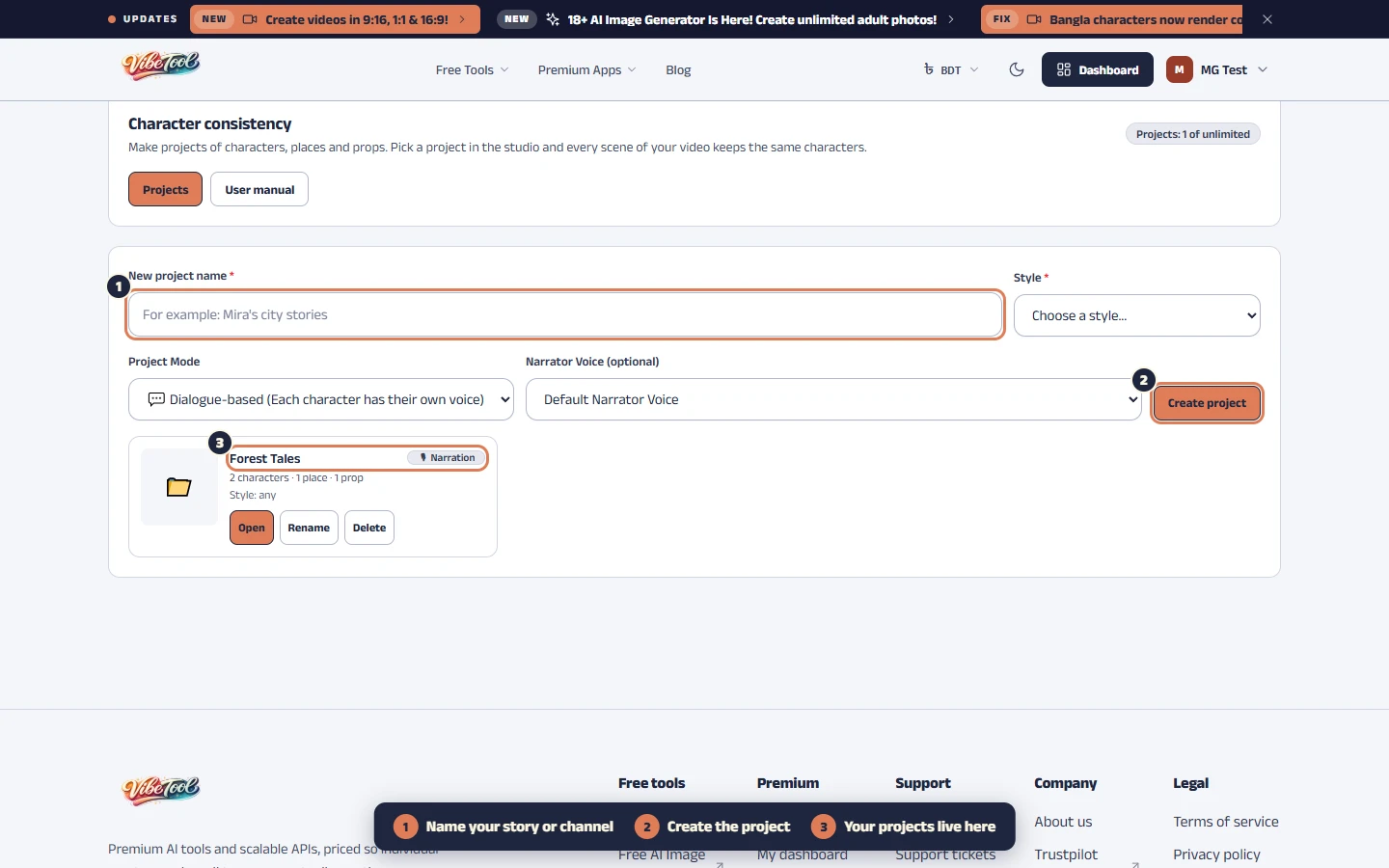


Swipe the screenshot sideways to see all of it
Tap-sync the lyrics, let an AI director plan the shots, draw consistent pictures, polish everything in a real timeline editor and export on your own device. Available on plans that include the Music video feature (see the comparison below). The screenshots below are from the real studio.
Press Space or TAP as each line starts. SRT, SBV, VTT and LRC files can be imported and exported.
One prompt for any AI chat plans every shot: camera, transitions, effects, light, colour and captions.
One picture per shot with your characters, places and props. Redraw, replace or load your own.
Timeline with the song waveform, pictures, effects, lyrics, texts and credits. Drag, split, delete and undo.
Camera moves, transitions, particles, light, colour grades and beat reactions for every picture.
Original, romanised, both or hidden, in many caption styles, with intro and final credits.
A semi-transparent name or handle with premade looks. Choose when it shows. Save it as a preset.
Link to your song with a scannable QR code and the logos of the music stores.
Cover, song and artist first, then a flip to the QR code, with colours taken from your cover.
Place the card over the last seconds, or after the video: the video grows and the music goes on.
Cut up to 10 reels from one song in 9:16, 1:1 or 16:9, each with its own plan, pictures and editing.
Titles, descriptions, captions and hashtags for YouTube Shorts, Instagram, Facebook and X, with your own saved text.
Your song and pictures stay on your device and the MP4 is made there. Nothing heavy is uploaded.
Export a 1080p or a lighter 720p MP4. The video starts with the first picture at once, never from a black screen.
Tap a step, or use the arrows, to see exactly what to press. The numbers on each screenshot match the marks.
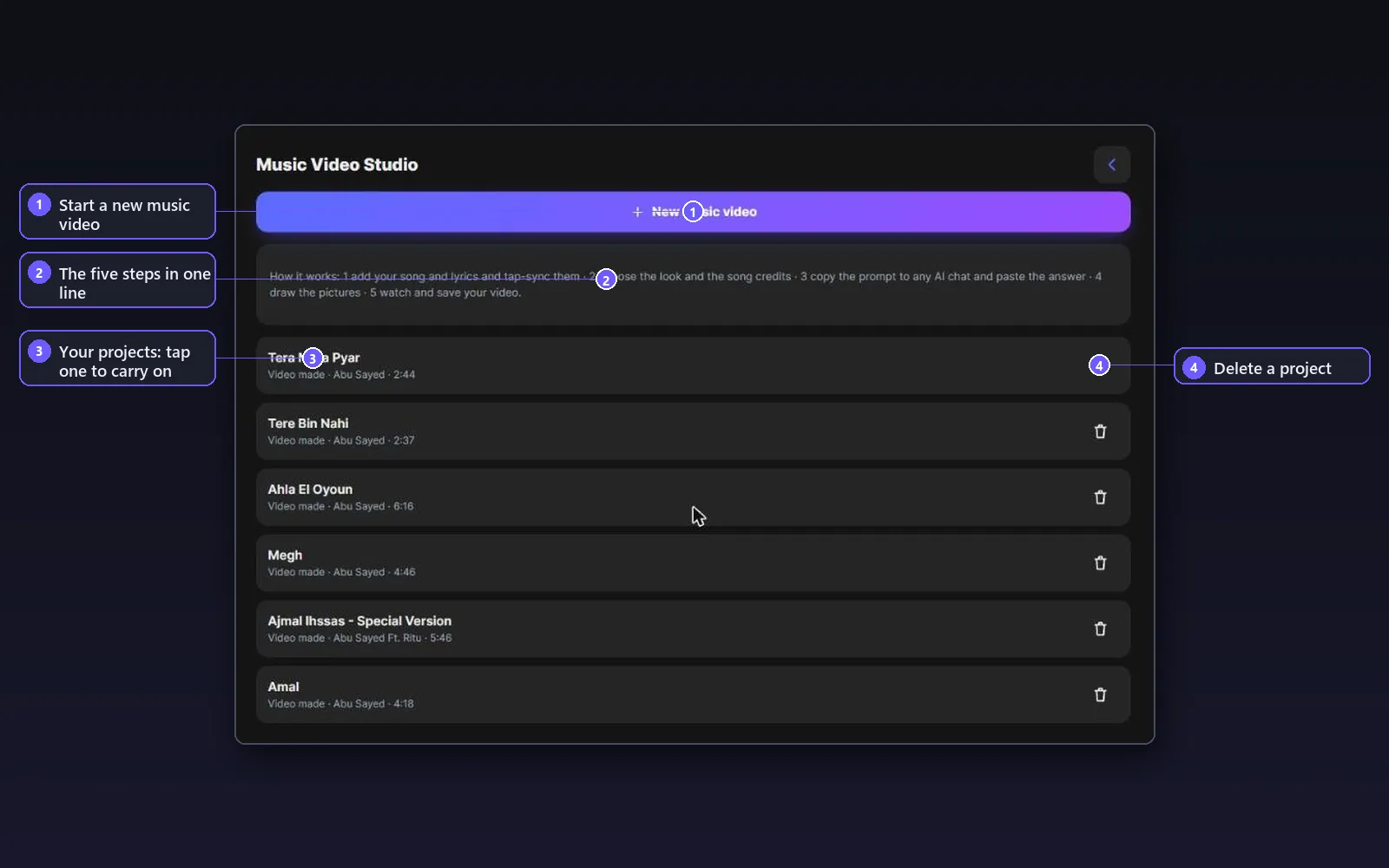


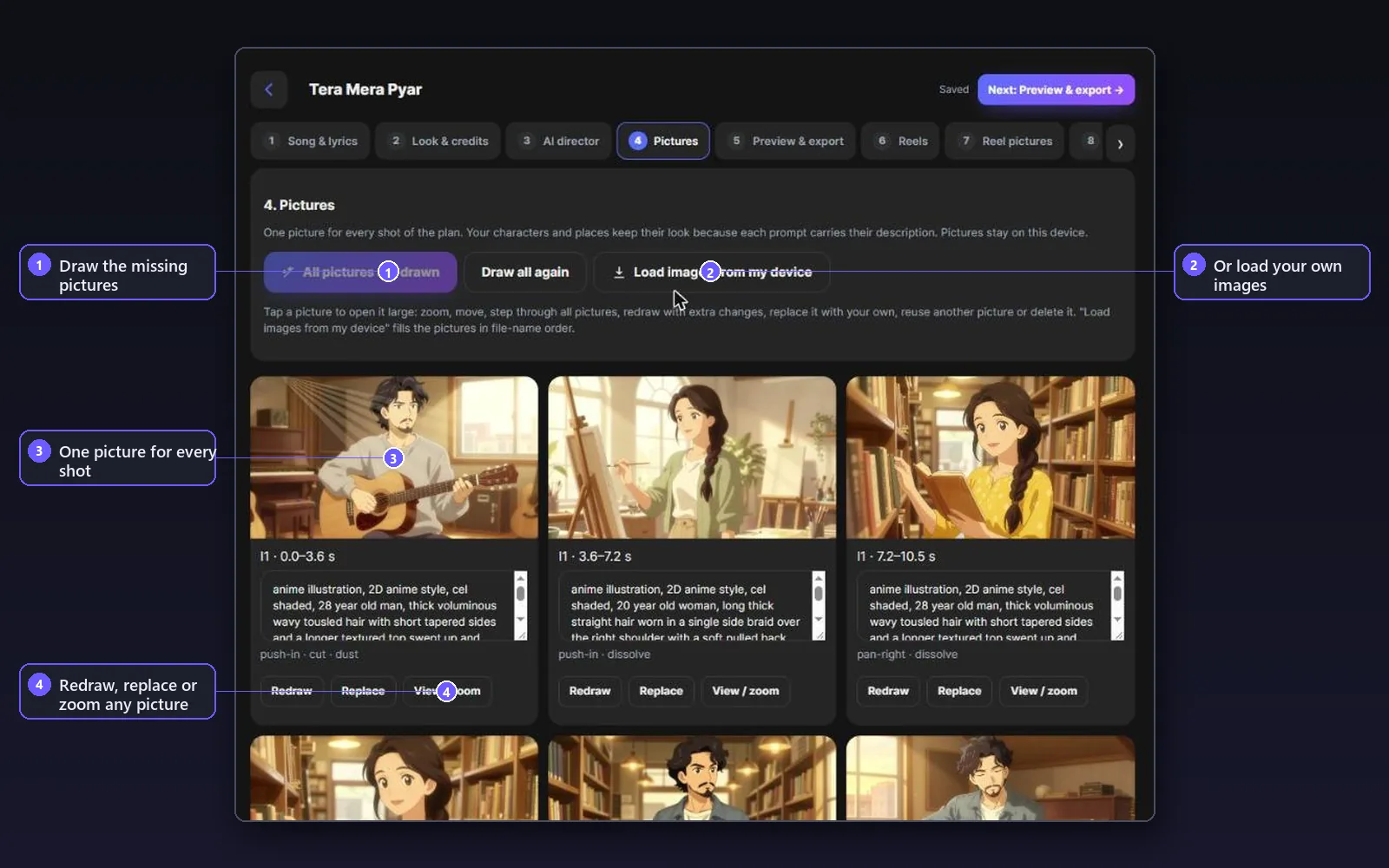

Swipe the screenshot sideways to see all of it
Change any picture, style the whole video, add a moving watermark and finish with an album-cover promo that flips to a QR code, so viewers can scan and listen.


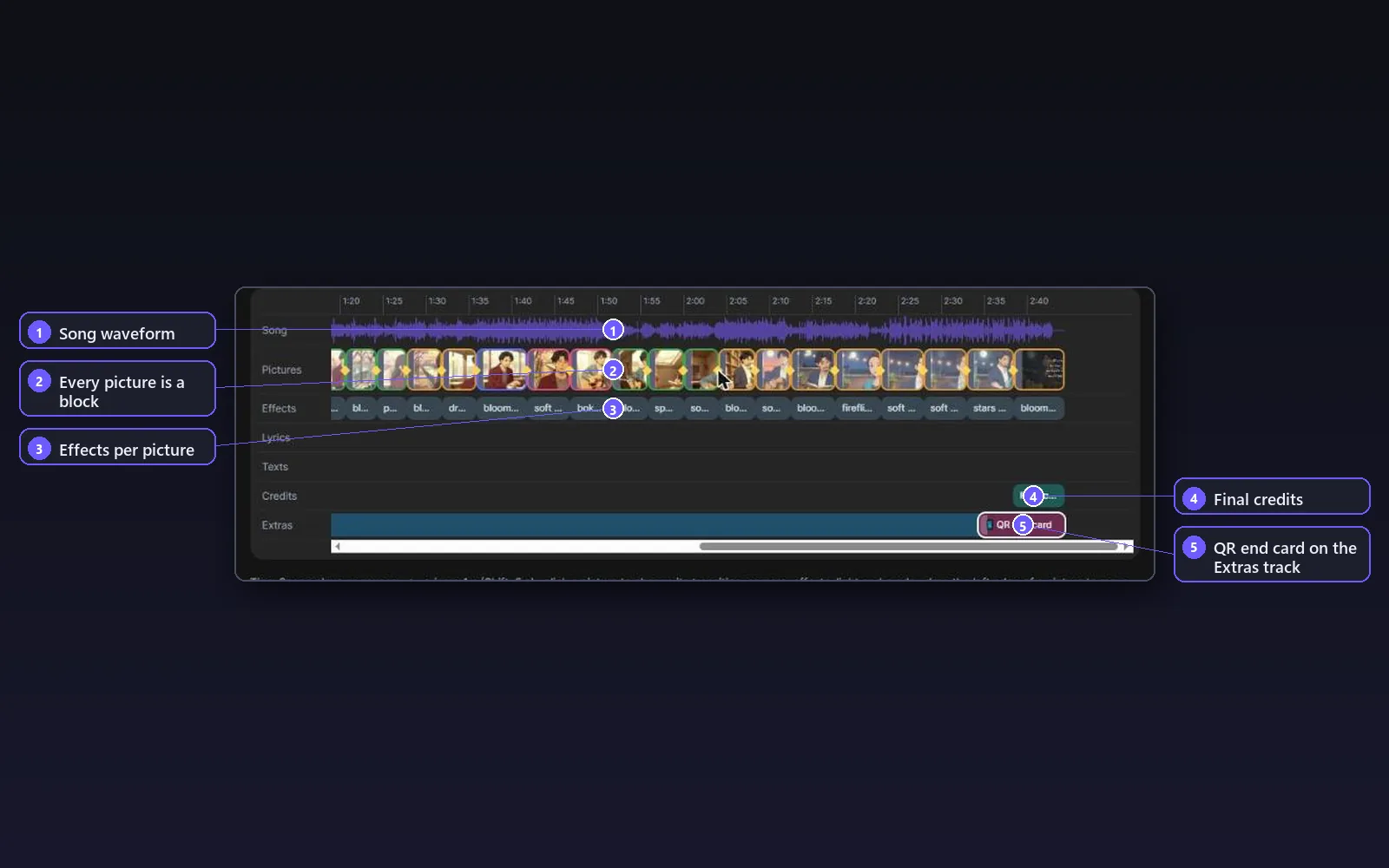
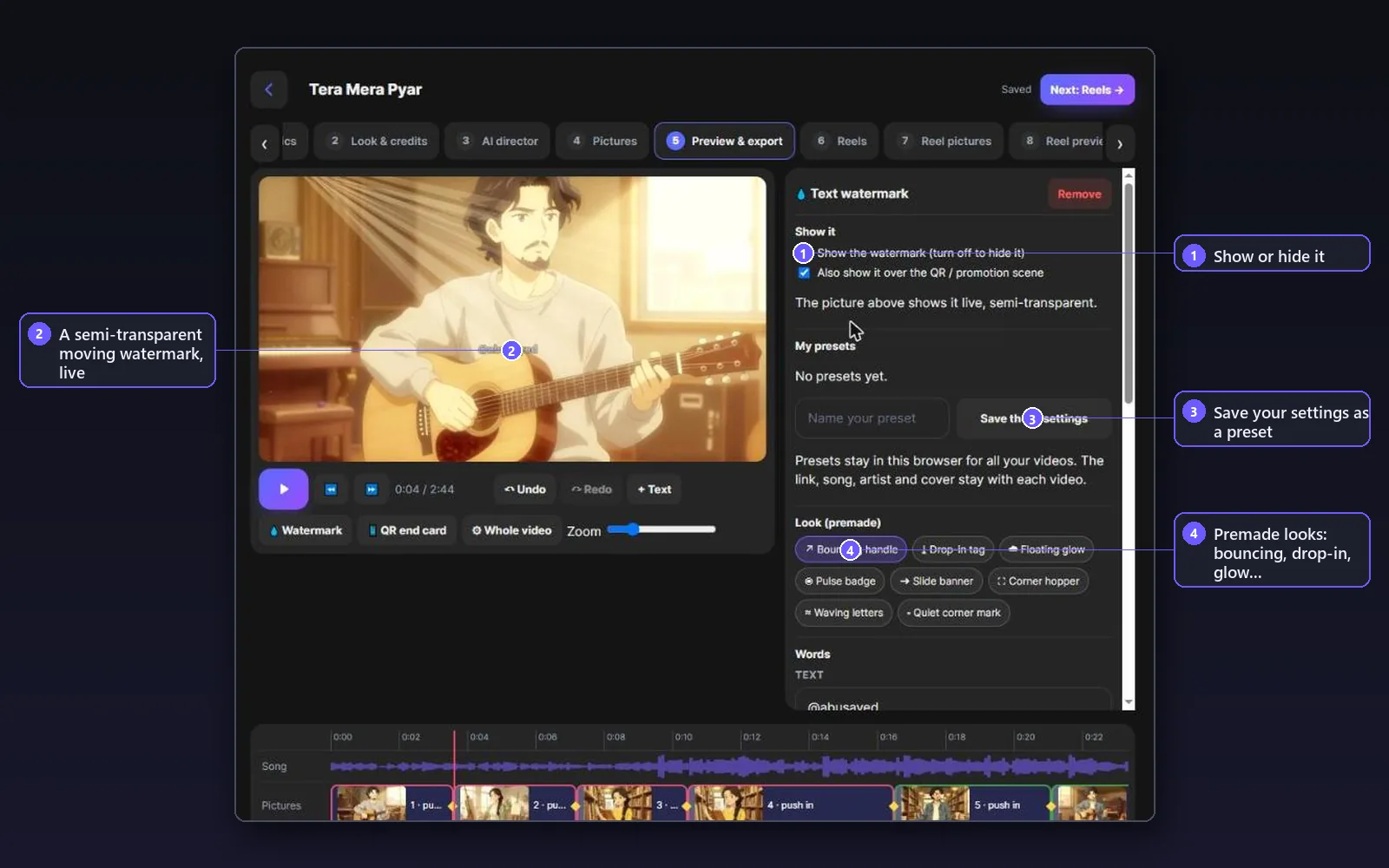


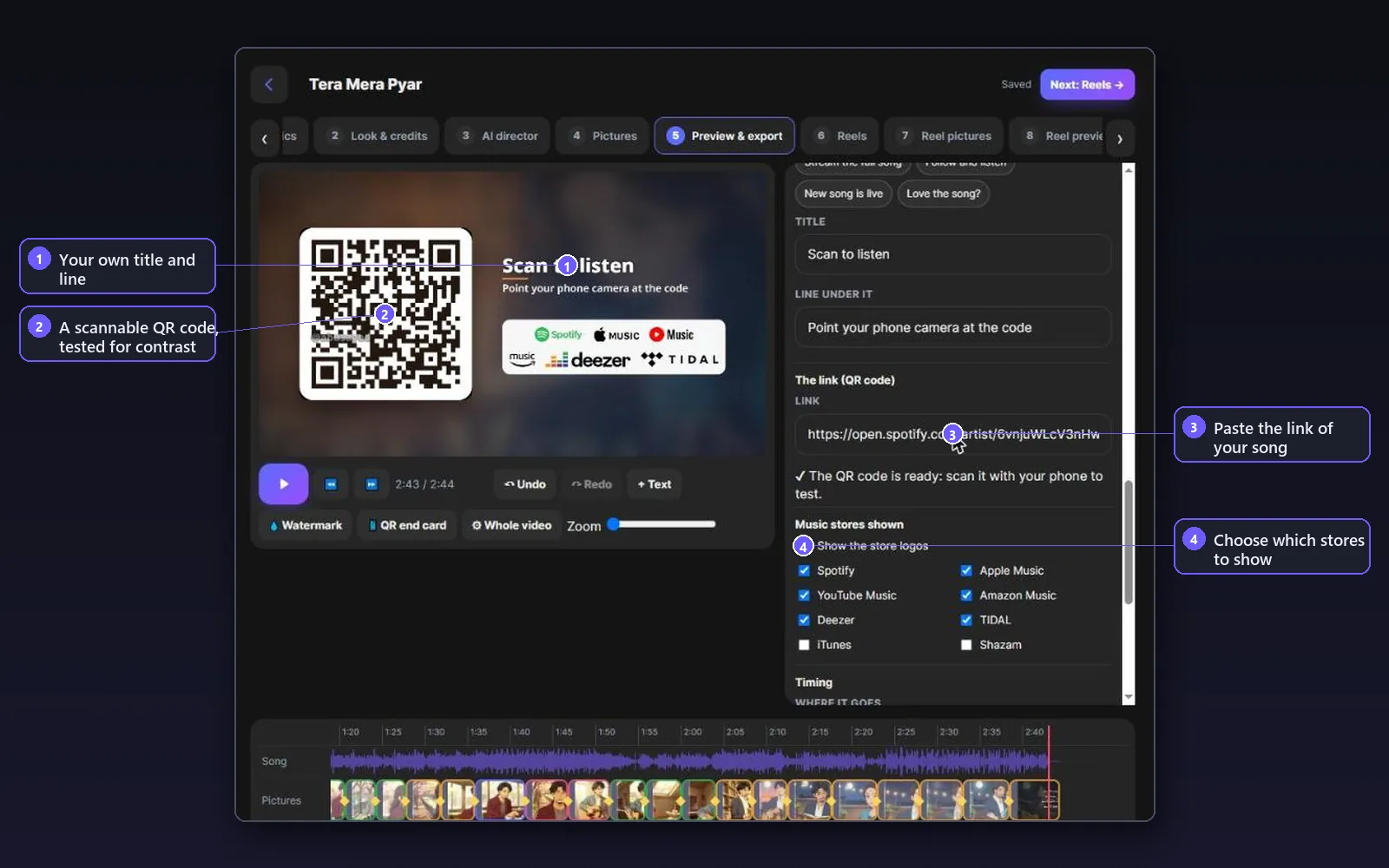
Swipe the screenshot sideways to see all of it
Pick the best parts of the song, make each one as a tall, square or wide reel, and copy a ready post for every platform.
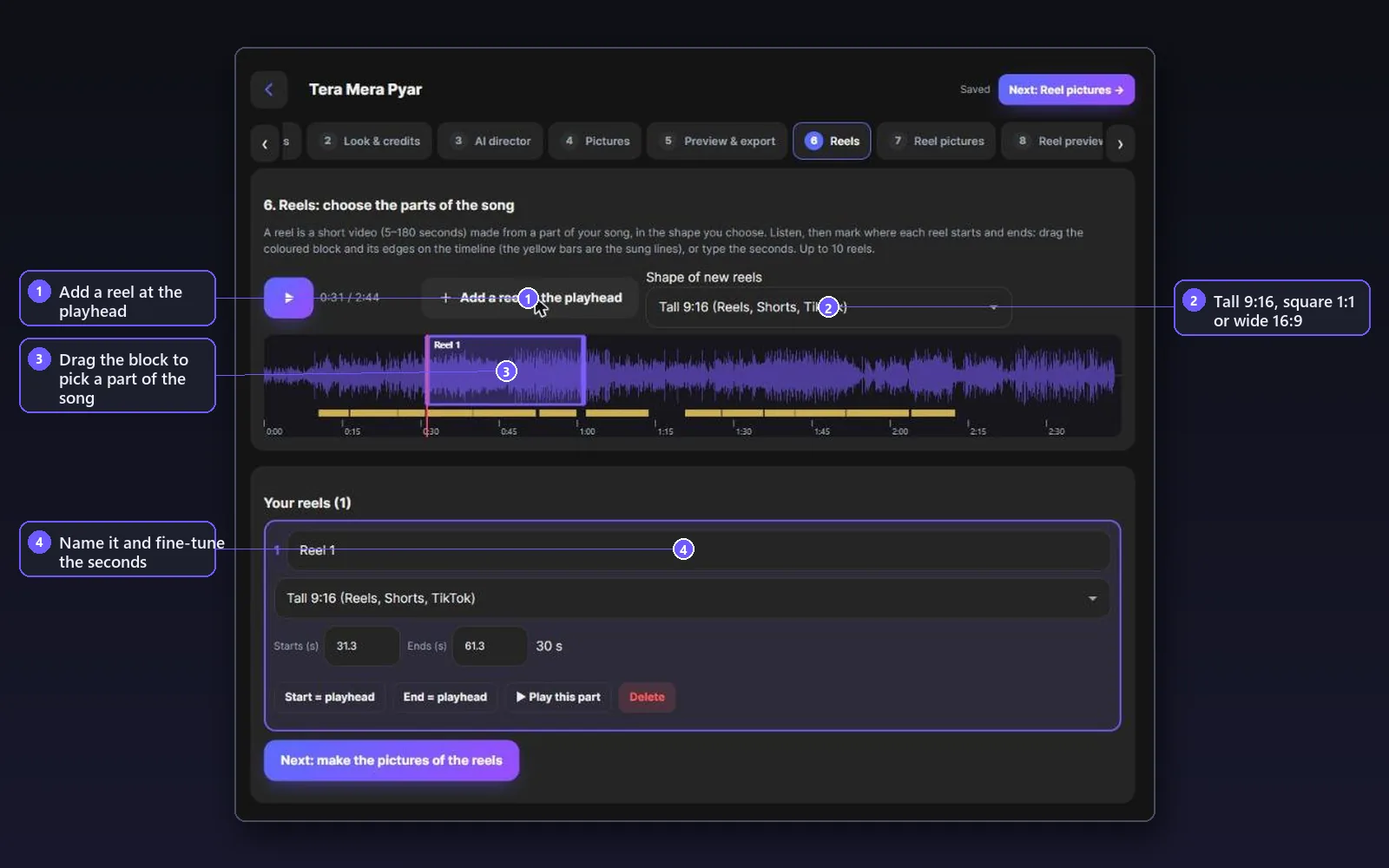

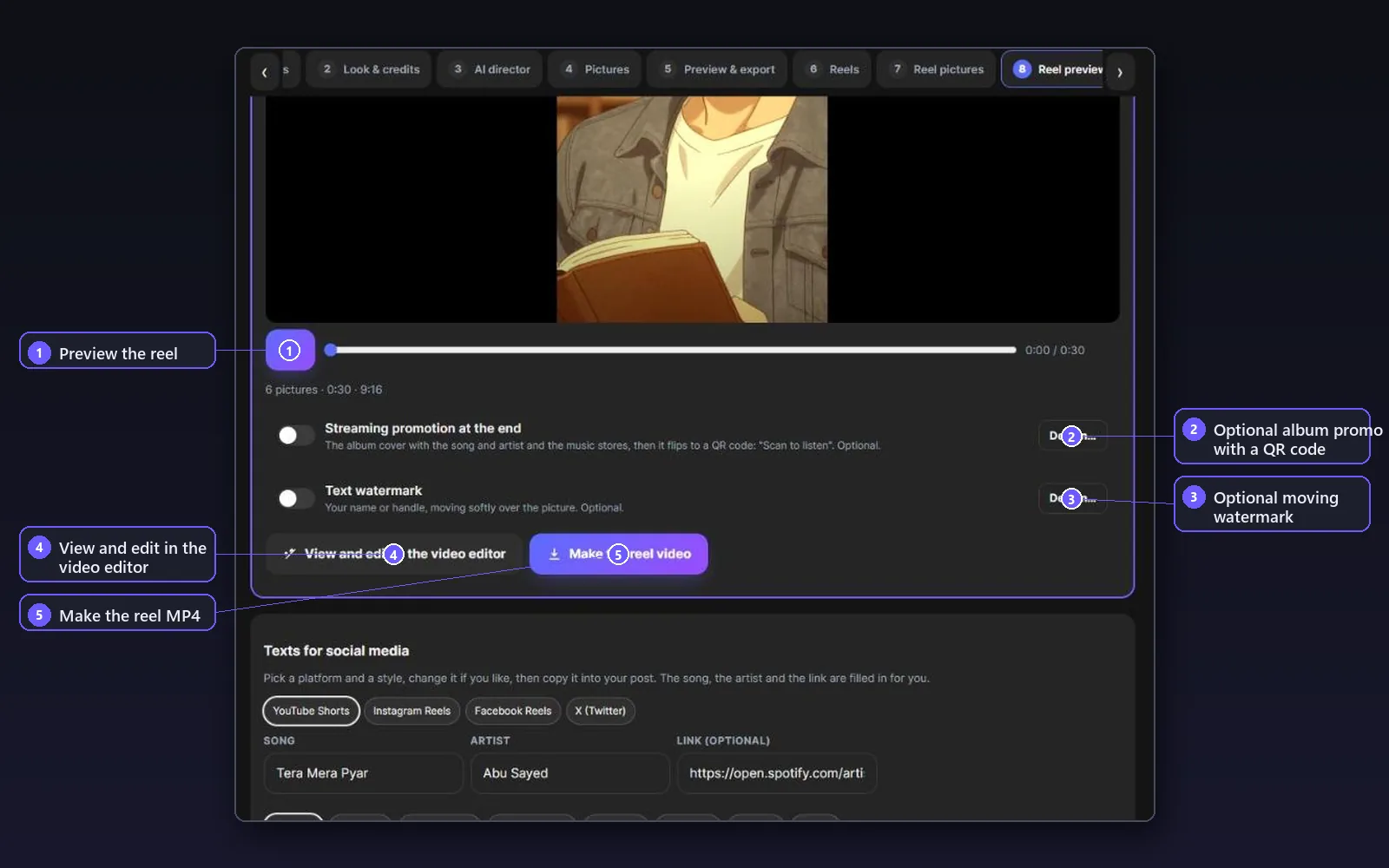

Swipe the screenshot sideways to see all of it
Keep every video, line up many ideas and let the studio make them one after another, and keep your account in order.


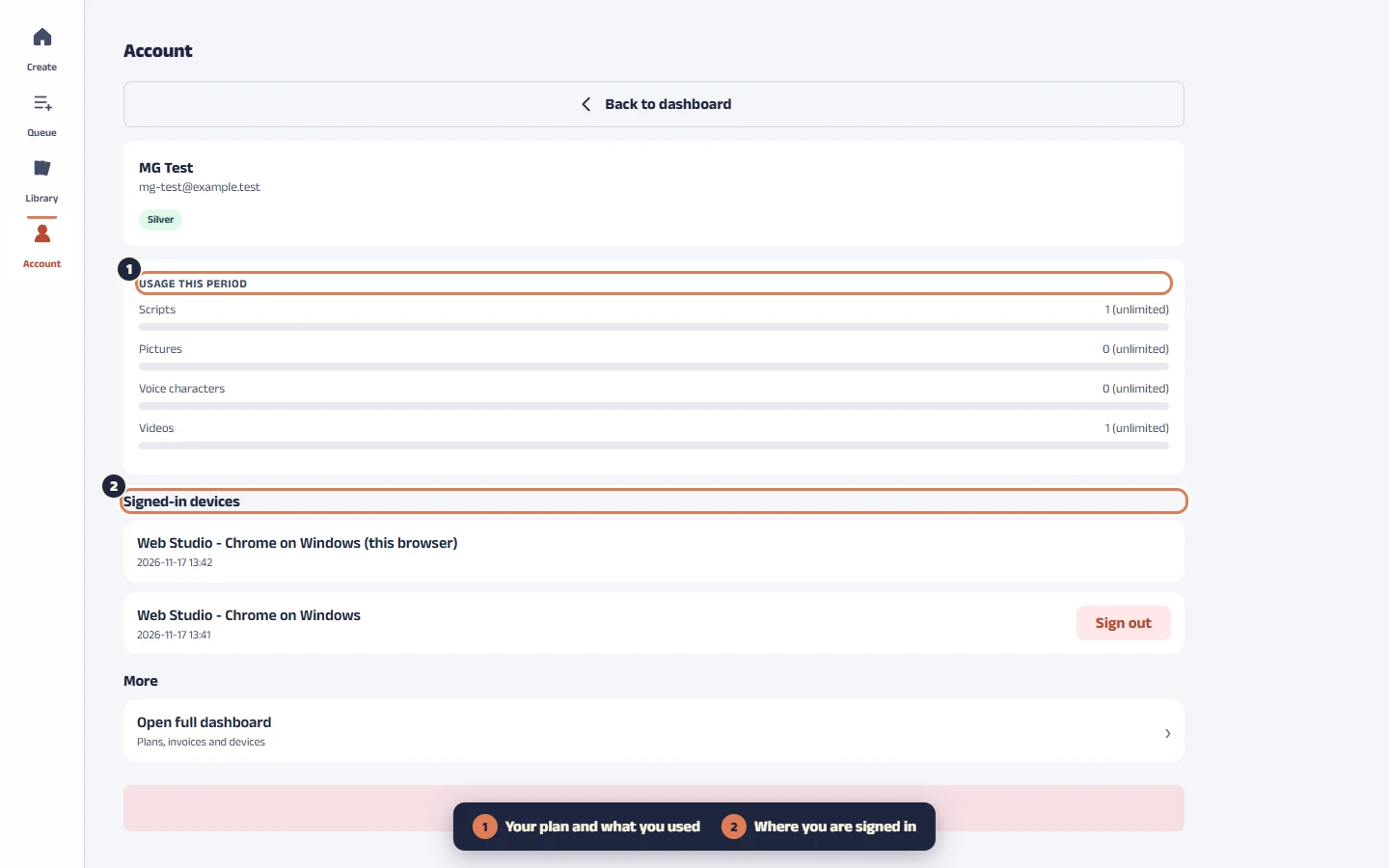
Swipe the screenshot sideways to see all of it
Many AI video tools charge for every minute or every export. Here the plan price is the price: make as many videos as you want, every month.
If the AI is busy, the studio waits and tries again for you, instead of throwing an error at the last step. You get a finished video.
Queue ten, twenty or thirty ideas, press Start once, and the studio makes and saves them one after another in your browser.
Every video can get a commercial licence PDF with its own verification page. Post with confidence.
A plain comparison of every plan: lengths, shapes, languages and devices. Pick the one that fits and check out from the plan cards.
| Compare plans |
Gold Best value
$20
per year
Save 20%
|
Titanium
$145
one-time, lifetime
Save 30%
|
|---|---|---|
| Video length | ||
| Up to 30 seconds | ||
| Up to 45 seconds | ||
| Up to 60 seconds | ||
| Up to 90 seconds | ||
| Up to 2 minutes | ||
| Up to 5 minutes | ||
| Up to 10 minutes | ||
| Video shape | ||
| Vertical 9:16Reels, TikTok, Shorts | ||
| Square 1:1Instagram, Facebook feed | ||
| Landscape 16:9YouTube, TV | ||
| Everything else | ||
| Videos you can make | Unlimited | Unlimited |
| LanguagesScript, voice-over and captions | 61 languages | 61 languages |
| Automatic captions | ||
| No watermark on your videos | ||
| Bulk queueLine up many ideas, the studio makes them one by one | ||
| Commercial licence PDF per video | ||
| Browsers signed in at once | 3 | 2 |
| Studios and characters | ||
| Story Maker web studioMake videos in your browser at app.vibetool.org/studio | ||
| Character consistencyProjects, characters, places and props that stay the same in every scene | ||
| Music Video StudioLyric and music videos: tap-sync, AI director, credits | ||
Video length
Video shape
Everything else
Studios and characters
Video length
Video shape
Everything else
Studios and characters
An AI video maker that runs in your browser and turns one sentence into a finished video: it writes the script, draws the scenes in the visual style you choose, records a voice-over in your language and adds animated captions. You type the idea, press Generate, and the finished video is saved to your Library on your own device.
Yes. Every plan includes unlimited video creation. There are no credits to count and no per-video fees, so you can make as many videos as you like for the price of the plan.
The script, the voice-over and the captions follow the language you pick, with 61 languages available, including English, Spanish, French, Hindi, Bengali, Arabic, Urdu, German, Portuguese and many more.
The Queue tab of the studio lets you write many video ideas, one per line, and press Start once. The studio then makes them one after another in your browser, saves each video to your Library and tells you when the queue is finished, so a whole week of content can be made while you do something else. Keep the tab open while it runs.
Every plan makes 30, 45 and 60 second videos. Longer plans add 90 seconds, 2 minutes and up to 5 minutes. The comparison table on this page shows exactly what each plan includes.
Yes. Every video can get a commercial licence PDF with a public verification page, so you can show proof of rights when you post or monetise it.
The studio keeps trying for you in the background instead of showing an error, so you end up with a finished video. If a request cannot be completed you are told clearly and your quota is not used.
No. Videos made on every plan are exported without a watermark.
The latest Chrome, Edge or Safari on a computer, and Chrome on Android phones and tablets. One account can be signed in on several browsers: 2 on Monthly, 3 on Yearly and 5 on Lifetime.
Only plans with the Music video feature. The "Studios and characters" rows in the comparison table show exactly which plans have it. Character consistency and the Story Maker web studio come with the plans listed in the same rows.
It is a timeline editor for your music video: the song waveform, every picture, effects, lyrics, texts, credits and extras each have their own track. You can drag the cut between pictures, split or delete a picture, redraw it, change its transition, camera movement, effects, light and colour grade, set one look for the whole video, add titles anywhere and undo any change. Everything shows in the preview at once and is used when you make the file.
Yes. The QR end card turns any link into a scannable QR code with a title such as Scan to listen and the logos of the music stores you choose. The premium look shows your album cover, the song and the artist first, with colours taken from the cover, then flips to the QR code. It can sit over the last seconds or after the video, which makes the video longer and lets the music go on.
There is no VibeTool watermark. You can add your own text watermark, a semi-transparent name or handle that moves over the picture, choose when it shows and save it as a preset.
A reel is a short video of 5 to 180 seconds cut from a part of your song, in the tall 9:16, square 1:1 or wide 16:9 shape. You mark the part on the waveform, give each reel its own AI plan (or a simple plan), draw its own pictures, edit it in the video editor and make its own MP4. You can make up to 10 reels from one song, and the main video is not changed.
Yes. After the reels are ready, the studio offers ready texts for YouTube Shorts, Instagram Reels, Facebook Reels and X, filled with your song, artist and link, with popular music hashtags. You can also save your own text, such as your record label or a made-with line, and have it put into every post.
On your own device. The song, the pictures and the finished MP4 are made and kept in your browser, and nothing heavy is uploaded.
Secure checkout with cards and local payment methods. Subscriptions can be cancelled at any time, and the Lifetime plan is a one-time payment.
Unlimited videos, 61 languages and a bulk queue, from a few dollars a month.
See plans and startSecure checkout. Cancel subscriptions any time.
Always free, no card
What is included
Ends Nov 30 · 8 seats left
What is included
Pay via US ACH wire or International SWIFT transfer directly to our business account.
US transfers (ACH)
International (SWIFT)
Need help with payment?
No comments yet. Be the first to start the conversation!
AI Video Maker (Music and Story)
From $20